OpenClaw (a.k.a Claudbot) is an open-source personal AI assistant (MIT licensed) created by Peter Steinberger that has quickly gained traction with over 180,000 stars on GitHub at the time of writing this blogs. Lots of traction, internet buzz and usecases that evolve from here. I am going to cover something else, what makes this different and really powerful. Its the Architecture and how it was productised .
Lets dive into different aspects
- The Gateway
- Channel Adapters
- Inputs: The Secret to “Aliveness”
- Agent Runtime & The Loop
- Context vs. Memory
- The Brain: LLMs & Prompts
- Access, Tools, Skills, and Canvas (A2UI)
- Sessions & Security Boundaries
- Multi-Agent Routing
- Dashboard & Monitoring
- Deployment Architectures
- Registry & Plugins
- Security as a Foundation to all above
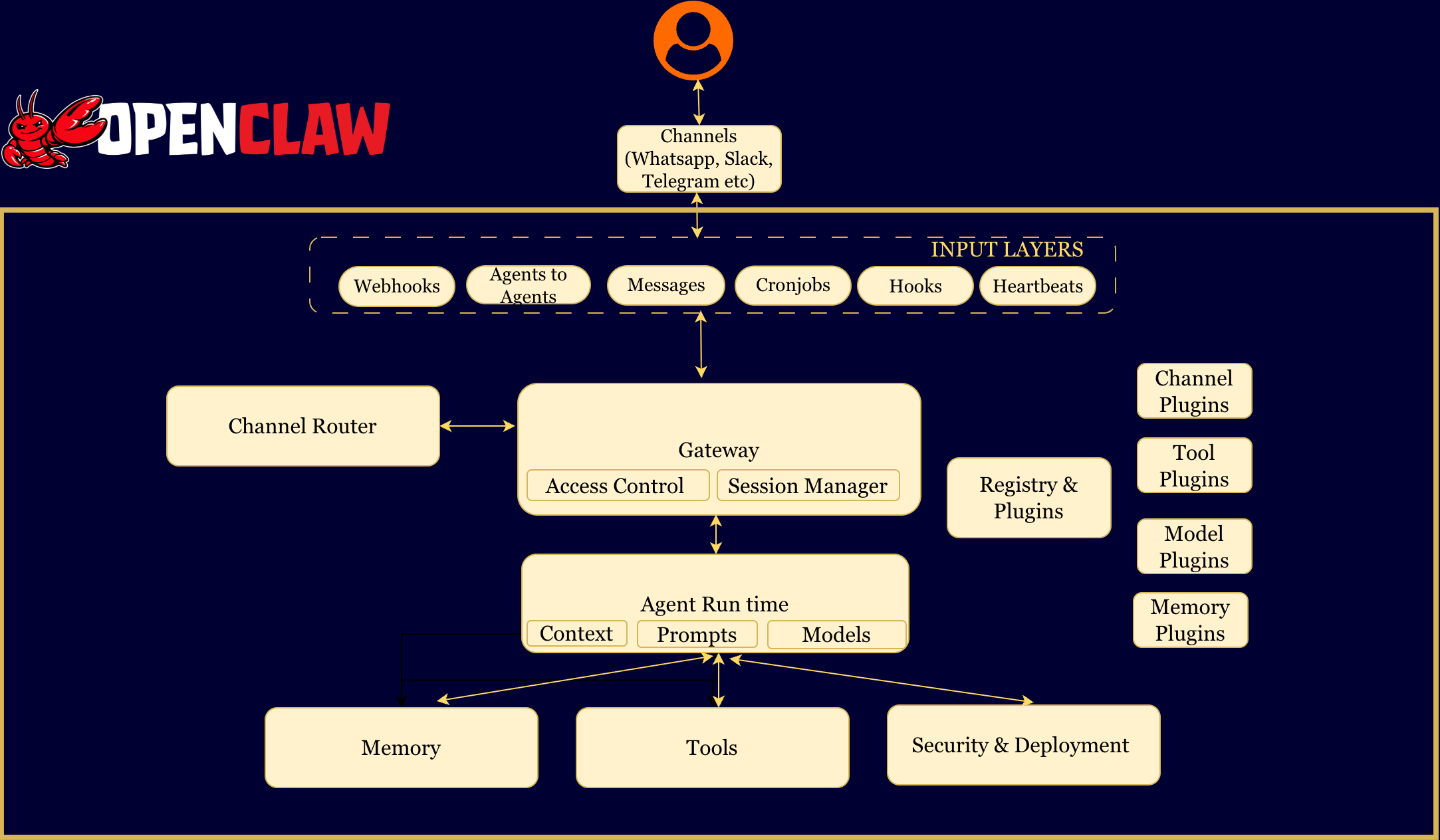
1. The Gateway
The heart of OpenClaw is the Gateway, a long-running WebSocket server (typically on localhost:18789) that sits on your machine.
Details
2. Channel Adapters
The Gateway does not natively understand specific platforms like WhatsApp or Discord. It relies on Adapters to normalise the messy reality of external APIs. Adapters perform four critical functions - Authentication, Normalisation,Access Control and Formatting
Details
3. Inputs: The Secret to “Aliveness”
Most AI bots are reactive (waiting for you to type). OpenClaw feels proactive because it treats Time and State as inputs, just like text messages. There are six primary inputs: Messages , Heartbeats, Cronjobs, Hooks and Webhooks , Agent to Agent messages.
Details
4. Agent Runtime & The Loop
The Agent Runtime executes the intelligence loop using an RPC Streaming model.
- The Queue: If multiple inputs arrive while the agent is busy, they are queued and processed in order. The agent finishes one “thought” before starting the next.
- The Loop:
- Resolve Session: Determine the security context (Main vs. Group).
- Assemble Context: Load rules, personality, and relevant memories.
- Stream & Intercept: The model’s response is streamed. If the model generates a tool call (e.g.,
bash), the runtime intercepts it, executes the code, and feeds the result back into the stream. - Persist: The updated state is written to disk.
5. Context vs. Memory
OpenClaw draws a hard line between Context (temporary, limited by token window) and Memory (persistent, stored on disk).
Context is what the model sees right now.
It includes:
- system instructions
- recent messages
- tool outputs
Context is:
- temporary
- limited by token windows
- expensive
Memory is what lives on disk.
It includes:
- daily notes
- long-term preferences
- past decisions
- prior session summaries
Memory is:
- persistent
- unbounded
- cheap to store
- searchable
Example
You tell OpenClaw:
“We decided last week to use PostgreSQL instead of MySQL.”
That sentence is not guaranteed to be in context tomorrow.
But if it was written to memory:
- it survives restarts
- it survives compaction
- it can be retrieved weeks later
Context forgets.
Memory endures.
Additional Details
MEMORY.md for facts, 2026-01-26.md for daily logs).POSTGRES_URL?” — keyword search finds it.
6. The Brain: LLMs & Prompts
OpenClaw is model-agnostic (supporting Claude, OpenAI, etc.). It constructs the “Brain” via Composite Prompting:
AGENTS.md: Core operational rules.SOUL.md: Personality and tone instructions.TOOLS.md: User-defined conventions for tool usage.- Skill Injection: It does not dump every available skill into the context window. It discovers skills at runtime and injects only the relevant ones to save tokens and reduce hallucinations.
7.Access, Tools, Skills, and Canvas (A2UI)
- Access: OpenClaw feels “alive” because it has deep access to your system. It can run shell commands, read/write files, execute scripts, and control your browser. While this enables powerful automation, it also poses significant risks (e.g., prompt injection or credential exposure) if not run in an isolated environment like a container.
- Core Tools: Agents have deep system access, including Bash terminal, File System, and Browser Automation (via Chrome DevTools Protocol).
- Tools: These are capabilities like email access, calendar access, or the ability to browse Twitter.
- Skills: There is a marketplace of over 31,000 skills available for agents. However, a security analysis has described this as a “security nightmare”. Risks include malicious skills executing code or deleting files.Consider like Apps in the Appstore. Some Apps are trustworthy some are not
- Canvas (A2UI): This stands for Agent-to-UI. The agent can generate HTML with special attributes (e.g.,
<button a2ui-action="approve">). The client renders this as a real UI. When you click it, a tool call is sent back to the agent. This allows agents to build their own interactive dashboards on the fly.
8. Sessions & Security Boundaries
A “Session” in OpenClaw is a security boundary, not just a chat log.
- Main Session (agent:main): The operator (you). Has full permissions to run tools directly on the host machine.
- DM/Group Sessions: Untrusted interactions. These are Sandboxed by default.
- Docker Sandboxing: Untrusted sessions are forced into ephemeral Docker containers. If a user in a group chat tricks the bot into running
rm -rf /, it only destroys the temporary container, not your laptop. - Pairing: You must explicitly “pair” devices and approve new DM contacts via a challenge-response system.
9. Multi-Agent Routing
You can configure specific Personas for different channels:
- Routing: A Discord bot can be configured to use
Claude Sonnetwith a “Moderator” personality, while your personal Telegram DM usesGPT-4with an “Executive Assistant” personality. - Collaboration: Agents use tools like
sessions_sendto delegate work. A research agent can finish a task and queue a job for a separate writing agent.
10. Dashboard & Monitoring
The system includes a self-contained control plane:
- Web UI: Served directly from the Gateway (
localhost:18789). It allows you to view chats, health status, and logs. - Clients:
◦ CLI: For developers to manage the gateway (openclaw gateway).
◦ macOS App: A native menu-bar app that manages the lifecycle and supports Voice Wake.
◦ Mobile Nodes: iOS/Android apps that connect as “nodes,” allowing the agent to access the phone’s camera or location.
11. Deployment Architectures
OpenClaw is designed to run on infrastructure you control:
- Local: Runs on
localhostfor development. - VPS (Remote): Runs on a Linux server. Accessed securely via:
◦ SSH Tunnel: Forwarding the local port to the remote server (Recommended).
◦ Tailscale: Using “Serve” (Tailnet-only) or “Funnel” (Public internet) modes.
- Cloud: Deployed via Docker containers on services like Fly.io for 24/7 availability.
Example of two setups illustrated here
Goal: Deeply personal, always-available assistant on your Mac (or Linux) with full host access, iMessage/voice wake, proactive heartbeats, and secure phone access. Key decisions: Adding Skills & Plugins (Solo) — From ClawHub: chat “install skill research-paper” or Security Tips (Solo) — Use Tailscale only; Solo User Setup
Architecture (Solo)
[ You + Phone + Devices ]
           │
           ▼
Multi-Channel Inputs (WhatsApp, iMessage, Telegram, CLI, Web)
           │
           ▼
Channel Adapter (normalize, auth, media)
           │
           ▼
Gateway Server (native, port 18789, runs as daemon)
      ┌─────────────┴─────────────┐
      ▼                           ▼
Lane Queue (serial per session)   Control Plane (Menu Bar + Dashboard)
           │
           ▼
Brain / Agent Runner (LLM selector, prompt builder, context guard)
           ↻
     Agentic Loop (think → act → observe)
           │
           ▼
Tool Execution (full host access – sandbox disabled)
├── Browser (semantic a11y)
├── Filesystem (full ~/)
├── Shell (allowlist optional)
├── Code REPL, APIs, etc.
           │
           ▼
Persistent Memory (~/clawd/ + MEMORY.md + hybrid search)
           │
Security & Guardrails (light – trusted main session)
           │
Response Path (streaming back to channels)
Step-by-Step Setup (Solo)
curl -fsSL https://openclaw.ai/install.sh | bashopenclaw onboard --install-daemon (sets up API keys, default LLM, LaunchAgent on macOS).sudo tailscale serve https://openclaw:18789 --https=443~/.openclaw/config.json: sandbox disabled for main, heartbeatInterval, dailyBriefing.openclaw gateway status and openclaw dashboardopenclaw skills install research-paper. From GitHub: openclaw skills install https://github.com/user/my-skill. Create your own: add SKILL.md in ~/.openclaw/skills/<name>/, then openclaw skills reload. Plugins: openclaw plugins install @openclaw/msteams or drop into ~/.openclaw/plugins/. Skills run with full host privileges — review before enabling.openclaw skills audit before installing; keep credentials in a separate workspace; regular openclaw update.
Goal: 24/7 centralized team brain with strict isolation, shared company memory, and controlled access for 5–50 users. Key decisions: Adding Skills & Plugins (SMB – governed) — Admin-only: Security & Governance (SMB) — Audit every skill with Small Enterprise Setup (SMB)
Architecture (SMB)
[ Team Members (Slack/Discord/Teams) ]
           │
           ▼
Public Channels + Webhooks → Gateway (Docker container)
           │
           ▼
Lane Queues (per user / per channel session)
           │
           ▼
Brain / Agent Runner (multi-persona routing)
           ↻
     Agentic Loop
           │
           ▼
Tool Execution Engine (strict Docker sandbox per turn)
├── Ephemeral containers (no host access)
├── Browser, Filesystem (rw in /workspace only)
├── Shell (very strict allowlist)
           │
           ▼
Persistent Shared Memory (mounted volume: MEMORY.md + company skills)
           │
Security Layer (allowlists, domain auth, budgets, audit)
           │
           ▼
Response Path (streaming + typing indicators)
           │
Control Plane (accessible only via SSH tunnel / Tailscale)
Step-by-Step Setup (SMB)
sudo apt update && sudo apt install curl git docker.io docker-compose-plugin and sudo usermod -aG docker $USERmkdir ~/openclaw-team && cd ~/openclaw-teamcurl -fsSL https://docs.openclaw.ai/install/docker.sh | bashdocker compose up -d and docker compose logs -fopenclaw skills install --admin research-paper. Company skills: private Git repo, mount at /skills/company, config skills.sources. Team flow: request in DM → admin reviews → install → announce. Plugins: same admin-only process.openclaw skills audit; resource budgets per user/session; append-only audit logs; capability tokens; regular container restarts and volume backups.
Quick Comparison
Feature Solo (Iron Man) SMB (Team Ops) Runtime Native on Mac/Linux Docker on VPS Sandbox Disabled/permissive Strict (ephemeral containers) Uptime Machine-dependent True 24/7 Adding skills Instant (just ask) Admin-approved Access Tailscale + native apps Slack/Discord + tunneled UI Best for Personal power user Team / company brain
12. Registry & Plugins
OpenClaw is architected as an operating system. Just as an OS needs drivers for new hardware and applications for new tasks, OpenClaw uses a Plugin System to add new capabilities, messaging platforms, and ai model providers.
The Plugin Architecture The system relies on a discovery-based model located in the The Four Types of Plugins OpenClaw supports extensibility across four distinct layers of the architecture: The Skill Registry & Marketplace While Plugins extend the system, Skills extend the agent’s knowledge. The Distinction: Code vs. Markdown The Workflow: (1) Plugin Load → registers e.g. Details
extensions/ directory. It does not require you to hardcode imports into the main server file.src/plugins/loader.ts) scans the workspace packages.openclaw.extensions field inside the package.json of installed packages.SKILL.md file in skills/<skill>/. It acts as a playbook or SOP.extensions/, TypeScript/JavaScript, register tools via api.registerTool.skills/ as SKILL.md, Markdown SOPs/playbooks.jira_create_ticket. (2) Skill Discovery → finds “How to manage projects”. (3) Injection → when you say “file a bug”, relevant Skill is injected. (4) Execution → agent calls the tool from the Plugin.
13 Security
Because OpenClaw gives an AI agent shell access to your machine, security cannot be an afterthought. It is the primary architectural constraint. OpenClaw implements a “Defense in Depth” strategy with five distinct layers of protection.
Layer 1: Network Isolation (The “Localhost” Default) — By default the Gateway binds to Layer 2: Device Identity & Cryptographic Handshakes — Device Pairing for CLI, Mobile Nodes, Web UI. Challenge-response; new devices need admin approval and get a device token. Layer 3: Channel Access Control — DM Pairing (unknown users get pairing code; block until Layer 4: Docker Sandboxing — Main session (you) runs on host. Untrusted sessions (dm/group) run in ephemeral Docker containers; e.g. Layer 5: Memory Safeguards — Secret detection/redaction before writing to memory. Fact verification (claims vs verified facts) to limit memory poisoning. Risks and MitigationsDetails
127.0.0.1. Remote access: SSH Tunneling (e.g. ssh -N -L 18789:127.0.0.1:18789) or Tailscale (Serve for Tailnet-only, Funnel for public with password).openclaw pairing approve). Allowlists for specific numbers/usernames. Group policies e.g. requireMention: true.rm -rf / only hits the container. Configurable granularity and strictness.Risk Description Mitigation Prompt Injection Attacker tricks LLM into ignoring rules Context isolation & sandboxing; untrusted sessions in Docker Malicious Skills Vulnerable or malicious community skills (e.g. 26% vulnerable) Tool sandboxing; vigilance for Main session skills Memory Poisoning False info stored in long-term memory Claim classification; scoped access (group vs Main memory) Credential Exposure Agent pastes .env into chatOutput filtering; sandbox limits filesystem access Unauthorized Access Guessed password/port Device identity: valid cryptographic key required